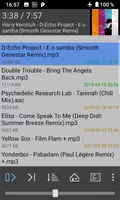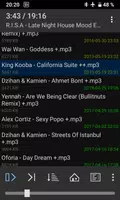
1by1 Directory Player is a lightweight audio player designed for those who want to enjoy their music directly from their device's directory. It supports a wide range of audio formats and offers a simple, user-friendly interface that makes navigating your music collection a breeze. With customizable playlists, shuffle and repeat options, and the ability to play music without a media library, 1by1 Directory Player is perfect for users seeking a straightforward audio playback experience without the clutter.
Features of 1by1 Directory Player:
- Smart View: Play audio files directly from folders without the need for playlists or media databases, making it easy to access your music.
- Sound Enhancing: Improve your audio quality with built-in enhancers for consistent volume and powerful sound.
- Crossfading: Experience smooth transitions between tracks with gapless and crossfade features, enhancing your listening experience.
- User-Friendly Interface: Navigate effortlessly through the app with its clear and simple design, saving time and conserving battery life.
FAQs
What file types does 1by1 support?
- 1by1 supports MP3, OGG, AAC, MP4, WAV, FLAC, and OPUS (OPUS only with OGG-extension in Android 5 and 6).
How do I troubleshoot if files are not showing?
- If files are not showing, ensure the app has the necessary folder permissions.
How can I report a problem or bug?
- Encounter any issues, crashes, or bugs? Please send an email to report them for quick assistance.
Efficient and Streamlined Audio Playback
1by1 is a minimalistic folder player ideal for those who prefer a clutter-free and efficient audio experience. It plays audio files directly from folders, eliminating the need for playlists or media databases. The clear and simple user interface ensures you don't waste time and battery on unnecessary features.
Smart and User-Friendly Features
The app's smart view and folder play functionalities make it easy to navigate and find your favorite tracks. Sound enhancing features and crossfading provide smooth transitions between songs. Resume play remembers the track and position, even if you switch between different folders. You can also bookmark tracks, positions, and lists for quick access.
Comprehensive File Management
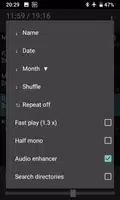
1by1 offers a file finder and directory finder, allowing you to quickly locate and play your audio files. It supports sort, shuffle, and repeat modes, giving you control over your listening experience. The app also allows you to export internal playlists and supports M3U/M3U8 playlist formats, as well as webstreaming via URLs in M3U playlists.
Enhanced Audio Quality
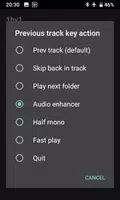
The app includes audio enhancers for consistent volume and powerful sound. Gapless playback and crossfade features ensure smooth transitions between songs. Mono mix and fast play options are also available. Note that for DSP to work, "Internal decoding" must be enabled in the settings on Android 4.1 or newer.
Customizable and Ad-Free
1by1 lets you customize your listening experience with track coloring by month or name, cover art (which can be disabled), and shortcuts via button long press. The sleep timer is another convenient feature for controlling your listening time. The app is ad-free, ensuring an uninterrupted listening experience.
Broad File Support and Permissions
The app supports a wide range of audio file formats, including MP3, OGG, AAC, MP4, WAV, FLAC, and OPUS (only with OGG-extension in Android 5 and 6). If no files are shown, check the permissions. The app requires permissions for wake lock (to keep playing when the screen is off), writing on the SD card (for track deletion and playlist export), internet access (for webstreaming), and Bluetooth (for connect options).
Customer Support
If you encounter any problems, crashes, or bugs, please send an email. Providing feedback helps more than leaving an untraceable 1-star rating, and the developers appreciate your support in improving the app.
What's New in the Latest Version 1.31
Last updated on Oct 25, 2021