Clash Royale: A Guide to Supporting Your Favorite Creators with Creator Codes
Clash Royale boasts a massive global player base, with countless players striving for mastery. Many players seek guidance from YouTubers and streamers, learning strategies and even adopting winning decks. As a thank you for this invaluable assistance, you can support your favorite content creators by redeeming their Clash Royale creator codes. A portion of your in-game purchases will then be shared with the creator you've chosen.
Updated January 15, 2025, by Artur Novichenko: This guide is regularly updated to ensure the accuracy of the creator codes listed.
All Current Clash Royale Creator Codes
 The roster of Clash Royale creators and their communities is constantly expanding. Below is a comprehensive list of current creator codes, enabling you to support your preferred content creator.
The creator's nickname is listed on the left, followed by their corresponding code on the right:
- Alvaro845 - alvaro845
- AmieNicole - amie
- Anikilo - anikilo
- Anon Moose - zmot
- Ark - ark
- Artube Clash - artube
- Clash with Ash - cwa
- Ash Brawl Stars - ashbs
- Ashtax - ashtax
- AtchiinWu - atchiin
- Aurel COC - aurelcoc
- AuRuM TV - aurum
- Axael TV - axael
- BangSkot - bangskot
- BBok TV - book
- Beaker’s Lab - beak
- BenTimm1 - bt1
- BigSpin - bigspin
- Bisectatron Gaming - bisect
- B-rad - brad
- BroCast - brocast
- Bruno Clash - brunoclash
- Bufarete - buf
- Captain Ben - cptnben
- CarbonFin Gaming - carbonfin
- Chicken Brawl - chicken
- Chief Pat - pat
- ChiefAvalon eSports and Gaming - chiefavalon
- Clash Bashing - bash
- Clash Champs - clashchamps
- Clashing Adda - adda
- Clash com Nery - nery
- Clash Ninja - ninja
- Clash of Stats - cos
- Clash Royale Dicas - clashdicas
- Clash with Cory - cwc
- Clash with Eric - OneHive - eric
- ClashGames - clashgames
- ClashPlayhouse - avi
- CLASHwithSHANE - shane
- Coach Cory - cory
- Coltonw83 - coltonw83
- Consty - consty
- CorruptYT - corrupt
- CosmicDuo - cosmo
- DarkBarbarian - wikibarbar
- DavidK - davidk
- Deck Shop - deckshop
- Decow do Canal - decow
- doluk_ - doluk
- DougieD - dougie
- DrekzeNN - drekzenn
- ECHO Gaming - echo
- Elchiki - elchiki
- erikuh - erikuh
- eVe MAXi - maxi
- Ewelina - ewe
- Ferre - ferre
- FlobbyCr - flobby
- FullFrontage - fullfrontage
- Galadon Gaming - galadon
- Gaming with Noc - noc
- GizmoSpike - gizmo
- GODSON-Gaming - godson
- gouloulou - gouloulou
- Grax - grax
- Guzzo games - guzzo
- Hey! Brother - heybrother
- iTzu - itzu
- Jo Jonas - jojans
- Joe McDonalds - joe
- JS GodSaveTheFish - jsgod
- Judo Sloth Gaming - judo
- JUNE - june
- KairosTime Gaming - kairos
- Kashman - kash
- Kenny Jo - clashjo
- KFC Clash - KFC
- kiokio - kio
- Klus - klus
- Klaus Gaming - klaus
- Ladyb - ladyb
- Landi - landi
- Legendaray - ray
- Lex - lex
- Light Pollux - lightpollux
- Lukas Brawl Stars - lukas
- Malcaide - malcaide
- Marcinha - garotas
- Mohamed Light - molight
- MOLT - molt
- MortenRoyale - morten
- MrMobilefanboy - mbf
- Namh Sak - shane
- Nana - nana
- Nat - nat
- NaxivaGaming - naxiva
- nickatnyte - nyte
- Noobs IMTV - noobs
- NyteOwl - owl
- Orange Juice Gaming - oj
- Ouah Leouff - ouah
- Oyun Gemisi - oyungemisi
- PitBullFera - pitbullfera
- Pixel Crux - crux
- puuki - puuki
- Radical Rosh - radical
- Rey - rey
- Romain Dot Live - romain
- RoyaleAPI - royaleapi
- Rozetmen - rozetmen
- Ruusskov - rurglou
- SHELBI - shelbi
- Sidekick - sidekick
- Sir Moose Gaming - moose
- SirTagCR - sirtag
- Sitr0x Games - sitrox
- SkullCrusher Boom Beach - skullcrusher
- sokingrcq - soking
- spAnser - spanser
- Spiuk Gaming - spiuk
- StarList - starlist
- Stats Royale - stats
- Sumit 007 - sumit007
- Sunnyenough - sun
- Surgical Goblin - surgicalgoblin
- Suzie - suzie
- The Chicken 2 - chicken2
- TheGameHuntah - huntah
- Trymacs - trymacs
- Vinho - vinho
- Well Played - cauemp
- WithZack - withzack
- Wonderbrad - wonderbrad
- Yde - yde
- YoSoyRick - yosoyrick
- Zsomac - zsomac
How to Redeem Creator Codes
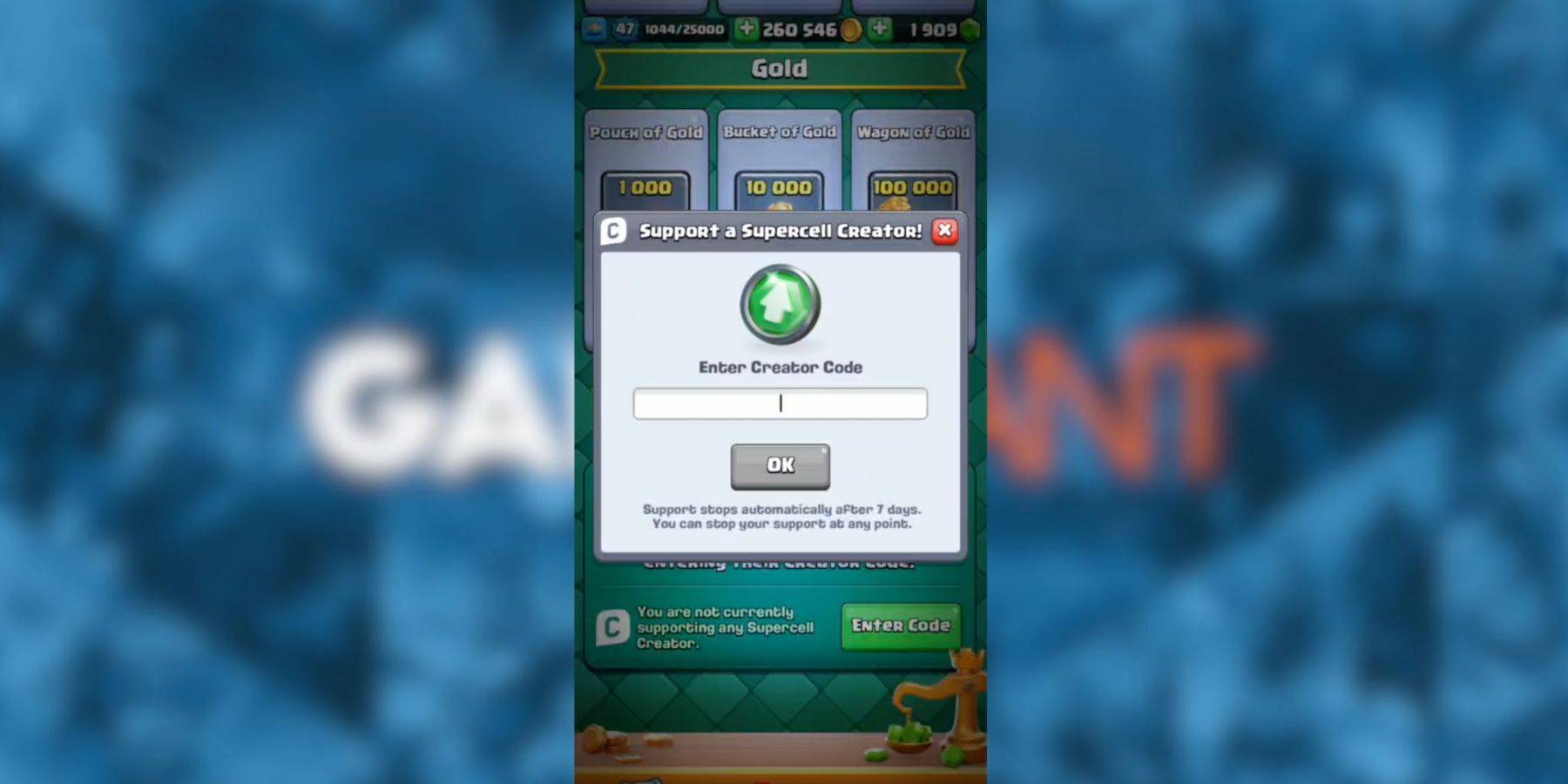 Redeeming creator codes is straightforward:
- Access the in-game store.
- Locate the "Creator Boost" section.
- Click the green "Enter Code" button.
- Enter a code from the list above into the input field.
- Click "OK" to confirm.
Remember, your support is not permanently assigned to a single creator. You can switch your support at any time.