The rise of cross-platform play has revolutionized online gaming, uniting the *Call of Duty* community in unprecedented ways. However, this convenience comes with potential drawbacks. This guide explains how to disable crossplay in *Call of Duty: Black Ops 6* and the implications of doing so.
Should You Disable Crossplay in Black Ops 6?
Disabling crossplay in Black Ops 6 presents a trade-off. The primary motivation for disabling it is to create a more level playing field. Console players, particularly on Xbox and PlayStation, often seek to avoid matchups against PC players due to the inherent advantages of mouse and keyboard controls—superior aiming precision, for example. The potential presence of cheaters and modders, despite anti-cheat measures like Ricochet, further fuels this desire. Disabling crossplay theoretically reduces encounters with these players.
However, a significant drawback is the reduced player pool for matchmaking. This can lead to longer search times and potentially less optimal connections with other players. Our experience shows that disabling crossplay often results in extended wait times and less desirable lobby conditions.
How to Turn Off Crossplay in Black Ops 6
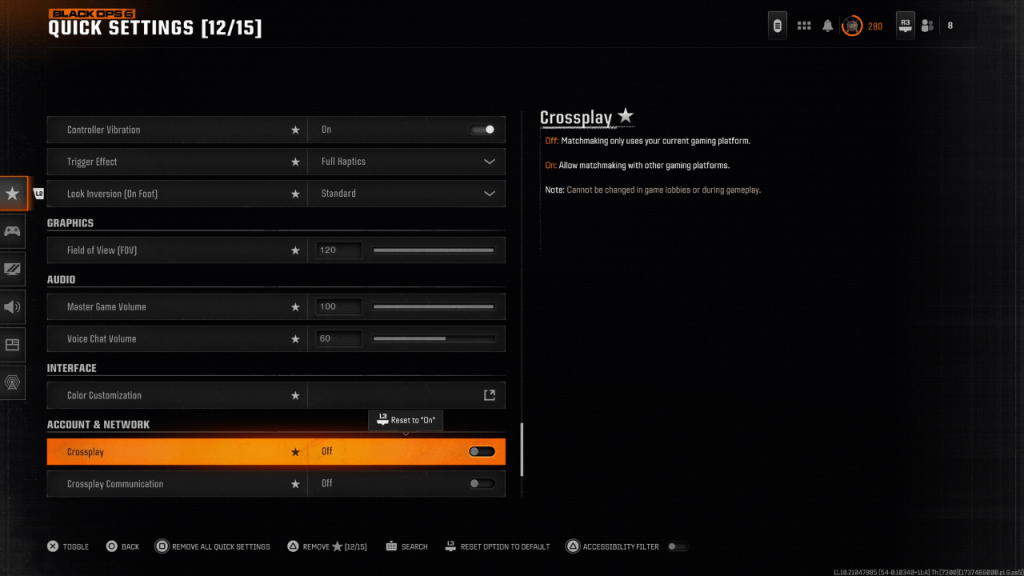
Disabling crossplay in Black Ops 6 is relatively simple. Locate the Crossplay and Crossplay Communications toggles within the Account & Network settings. These are usually found near the top of the settings menu. Simply toggle the setting from "On" to "Off" by pressing X or A. This can be done from within Black Ops 6, Warzone, or the main Call of Duty HQ page. Note that the image shows the Crossplay setting added to Quick Settings for easier access.
You might find the setting greyed out and unavailable in certain game modes. Previously, Call of Duty mandated crossplay in modes like Ranked Play, ostensibly for fairness. However, this often had the opposite effect. Thankfully, Season 2 of Black Ops 6 provides more player choice, allowing crossplay disabling even in competitive modes.
Call of Duty: Black Ops 6 is available now on PlayStation, Xbox, and PC.