When diving into a high-caliber game like *Call of Duty*, players demand top-notch graphics to fully immerse themselves in the action. Yet, if you're noticing that *Call of Duty: Black Ops 6* looks grainy and blurry, impacting your ability to spot targets, don't worry—here’s how you can enhance your visual experience.
Table of contents
Why Does Black Ops 6 Look Grainy & Blurry? AnsweredHow to Turn Off Blur in Call of Duty: Black Ops 6How to Reduce Grain and Improve Clarity in Black Ops 6How to Improve Black Ops 6 Image Details and Textures
Why Does Black Ops 6 Look Grainy & Blurry? Answered
If Black Ops 6 appears grainy and blurry on your system, even after tweaking your hardware settings to ensure you're running at the highest possible resolution, the issue might lie within the game's settings itself. Sometimes, updates can reset these settings to default, so it's worth checking the graphics settings. Navigate to the Display, Quality, and View tabs to find the settings that most directly impact image quality.
How to Turn Off Blur in Call of Duty: Black Ops 6
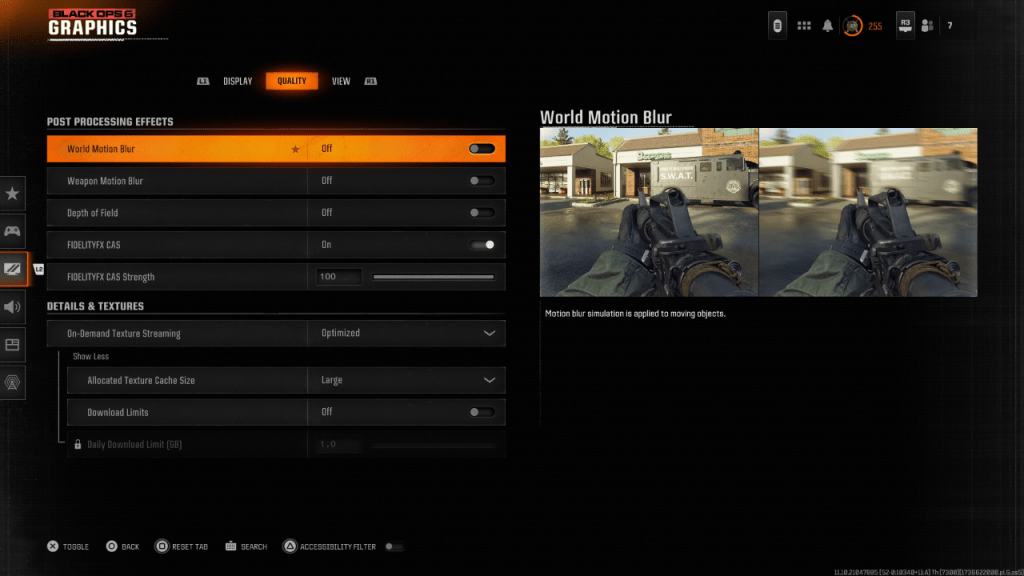 For a cinematic touch, games often include Motion Blur and Depth of Field to mimic real-world camera effects. While this adds to the immersion in story-driven games, it can hinder visibility in fast-paced action titles like Call of Duty: Black Ops 6.
To disable these effects:
- Go to the graphics settings, select the Quality tab, and scroll to Post Processing Effects.
- Turn World Motion Blur to Off.
- Turn Weapon Motion Blur to Off.
- Turn Depth of Field to Off.
How to Reduce Grain and Improve Clarity in Black Ops 6
If the image quality still seems off after the above adjustments, your gamma and brightness might need calibration. In the Black Ops 6 graphics settings under the Display tab, adjust the Gamma/Brightness slider until the Call of Duty logo in the center panel is just barely visible. A setting of 50 often works well, but tweak it according to your display.
Next, in the Quality tab, ensure FIDELITYFX CAS is On. This activates AMD's FidelityFX Contrast Adaptive Sharpening, enhancing the sharpness of the visuals. The default setting of 50/100 is usually sufficient, but cranking it up to 100 can offer even crisper images if needed. If clarity remains an issue, On-Demand Texture Streaming could be the culprit.
How to Improve Black Ops 6 Image Details and Textures
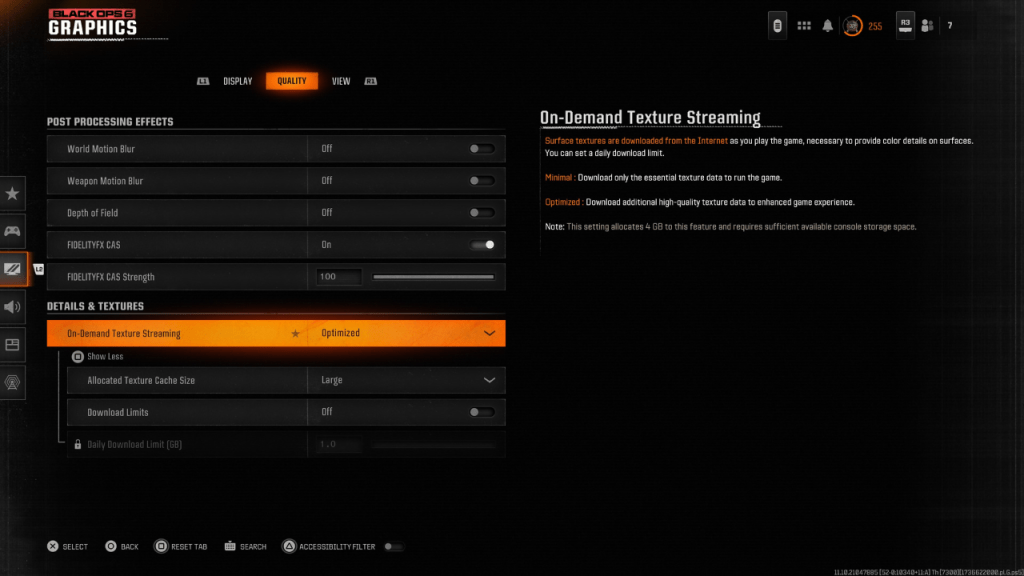 To manage the hefty file sizes of modern Call of Duty titles, Black Ops 6 uses On-Demand Texture Streaming. This system downloads textures in real-time, reducing local storage needs but potentially affecting image quality.
For optimal image quality, navigate to the Details & Textures settings in the Quality tab:
- Set On-Demand Texture Streaming to Optimized for higher quality textures.
- Click "Show More" and adjust the Allocated Texture Cache Size to Large to hold more downloaded textures at once.
- If your internet plan allows, switch Download Limits to Off to ensure Black Ops 6 can download as many high-resolution textures as needed for peak graphical performance.
By following these steps, you can significantly improve the visual clarity of Call of Duty: Black Ops 6 and enjoy the game as it was meant to be experienced.